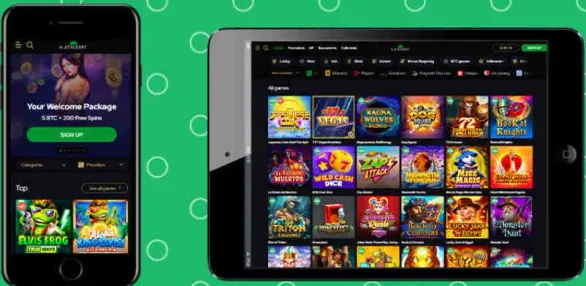

Browser Access Instead of App Download
We run Katsubet Casino through mobile browsers rather than a separate app. Canadian players will not see us in Google Play or the App Store, but nothing important is missing. The full casino catalog, account tools and payment options all work directly in Safari, Chrome, Firefox or any current browser on Android and iOS.
No installation, no storage issues, no manual updates. Our system detects your device and adjusts the layout, buttons and menus to your screen. Phone or tablet, small display or large, the interface reshapes itself without extra actions from your side.
Getting Started on Mobile
To begin, open your mobile browser and go to our official website. Use the menu icon to access the login area, enter your existing details or create a new account. If the browser asks for basic permissions, just confirm them so the casino loads correctly.
We recommend adding the page to bookmarks or placing a shortcut on your home screen. That icon behaves almost like a native app and jumps straight into the casino, without typing the address every time. The whole setup usually takes a couple of minutes, less if you already registered with us.
Game Library and Performance
More than 5,000 titles run through HTML5, so you launch them straight from the browser. All the main formats are there: slots, tables, live dealer studios, plus a few niche categories. Everything that is available on desktop also works on mobile. Content comes from providers such as Pragmatic Play, Evolution Gaming, Betsoft, BGaming and several others.
| Game Type | Count | Mobile Features |
|---|---|---|
| Slots | 4,800+ | Touch controls |
| Table Games | 300+ | Landscape support |
| Live Dealer | 150-200+ | HD streaming |
| Jackpots | 180+ | Real-time updates |
Games open in a full-screen view inside the browser window. You can sort them by provider, game type or popularity using the dropdowns, or just type a title into the search bar. Progress is stored through browser cookies and your account, so if you change devices mid-session, your balance and status stay in sync.
Live dealer tables work best on a stable connection, usually from 3-5 Mbps to keep HD video smooth. The stream automatically adjusts quality to match your bandwidth. Standard slots and tables usually play fine even on 3G networks, just with slightly longer loading times.
Traffic consumption depends on the format. Regular slots generally use around 10-30 MB per hour, while live dealer tables with HD video can reach 200-500 MB per hour, depending on the quality level. If you play through mobile internet instead of WiFi, it is worth checking usage in your device settings.
Account Management Functions
All key account tools are available on mobile in the same way as on desktop. The account dashboard sits in the top navigation, shown as your profile icon or username.
From there you can:
- Update personal and contact details
- Change passwords and enable two-factor authentication
- Upload verification documents
- Review transaction history and bonus status
- Configure responsible gambling tools like deposit limits or self-exclusion
Any change you confirm is applied instantly and becomes visible on all devices linked to your account.
Two-factor authentication adds another layer for mobile sign-ins. After activating it in your profile, each login will require both your password and a time-based code from an authenticator app. Even if somebody learns your password, this extra step helps to block unwanted access.